R7 World
  • 0 Carro de Pedidos
  • Área de Clientes
  • Tienda
    • Ver Todos
    • Best Web Hosting
    • Premium Web Hosting
    • Cheapest Shared Hosting
    • Wordpress Hosting
    • Ecommerce Web Hosting
    • Developer Hosting
    • Reseller Web Hosting
    • Master Reseller
    • VPS
    • Registrar Dominios
    • Transferir Dominios
    • Kit de herramientas WP
  • Anuncios
  • Preguntas Frecuentes - FAQ
  • Estado de la Red
  • Afiliaciones
  • Contáctenos
  • Más
  • Cuenta
    • Entrar
    • Registrarse
    • ¿Perdiste la contraseña?
  1. Administración
  2. Preguntas Frecuentes - FAQ
  3. PayPal
  4. How to Remove a Debit or Credit Card From PayPal

  Categorías

Backup/Restore
4
Category Name
1
Cloudflare (cPanel)
9
CloudLinux (cPanel)
10
Cpanel
1
cPanel - Control Panel
24
Databases
11
DirectAdmin
48
DNS - Nameservers
6
Domain Management
10
Email
17
FTP
9
Installing a Control Panel
6
Mail Filters & SPAM
8
Mobile
11
Others
3
PayPal
7
Plesk
47
Security
10
SiteWorx (Control Panel)
58
Softaculous
69
SolusVM
18
SSL
5
Virtualizor
19
WHM
18
WordPress
17

  Categorías

  Nube de Etiquetas

auto installer domain ICANN domain install applications install Joomla install Wordpress verify WordPress

  Soporte

Mis Tickets de Soporte
Anuncios
Preguntas Frecuentes - FAQ
Descargas
Estado de la Red
Abrir Ticket

How to Remove a Debit or Credit Card From PayPal Imprimir

  • 0


Follow this tutorial to remove your Debit or Credit Card from your PayPal account.


1. Log in to your PayPal account.


2. On top of the menu, click on Wallet.

paypal-click-on-wallet-menu.gif


3. Click on the card you want to remove from the left side.
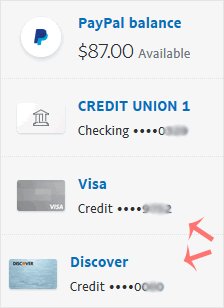
paypal-remove-card-select.gif


4. Scroll down and click on Remove Card.
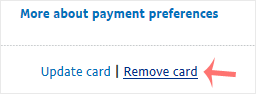
paypal-remove-card-link.gif


5. Confirm with Yes or Remove This Card.


Once removed, it will display a confirmation message.



¿Fue útil la respuesta?

Artículos Relacionados

How to Check Automatic PayPal Subscriptions   You can view the list of automatic PayPal subscriptions you have.   1. Log in to your PayPal... How to Cancel an Automatic PayPal Subscription   You can cancel pre-approved, automatic payments, or a subscription in your PayPal account.... How to Link a Debit or Credit Card to Your PayPal Account   Follow this tutorial to link your Debit or Credit Card to your PayPal Account.   1. Log in... How to Set a Preferred Payment Method in PayPal   With multiple Debit or Credit cards, you can set your proffered payment method in PayPal.... How to Subscribe to an Invoice via PayPal   You can subscribe to an invoice for recurring payments. The subscription option is only...
« Atrás

  Nube de Etiquetas

auto installer domain ICANN domain install applications install Joomla install Wordpress verify WordPress

  Soporte

Mis Tickets de Soporte
Anuncios
Preguntas Frecuentes - FAQ
Descargas
Estado de la Red
Abrir Ticket
  • Contáctenos
  • Términos del Servicio y Condiciones de Uso

Copyright © 2025 R7 World. Todos los derechos reservados.


Cargando...
Cargando...
Cambiar Lenguaje
العربية
Azerbaijani
Català
中文
Hrvatski
Čeština
Dansk
Nederlands
English
Estonian
Persian
Français
Deutsch
עברית
Magyar
Italiano
Macedonian
Norwegian
Português
Português
Română
Русский
Español
Svenska
Türkçe
Українська

Elegir Divisa

₹ INR
$ USD

Generar contraseña

La longitud de la contraseña debe estar entre 8 y 64 caracteres