R7 World
  • 0 Košarica
  • Početna
  • Trgovina
    • Pregledaj sve
    • Best Web Hosting
    • Premium Web Hosting
    • Cheapest Shared Hosting
    • Wordpress Hosting
    • Ecommerce Web Hosting
    • Developer Hosting
    • Reseller Web Hosting
    • Master Reseller
    • VPS
    • Registriraj novu domenu
    • Premjestite domenu kod nas
    • WP komplet alata
  • Obavijesti
  • Baza znanja
  • Status mreže
  • Podružnice
  • Kontaktirajte nas
  • Više
  • Račun
    • Prijava
    • Registtracija
    • Zaboravili ste lozinku?
  1. Početna WHMCS
  2. Baza znanja
  3. PayPal
  4. How to Check Automatic PayPal Subscriptions

  Kategorije

Backup/Restore
4
Category Name
1
Cloudflare (cPanel)
9
CloudLinux (cPanel)
10
Cpanel
1
cPanel - Control Panel
24
Databases
11
DirectAdmin
48
DNS - Nameservers
6
Domain Management
10
Email
17
FTP
9
Installing a Control Panel
6
Mail Filters & SPAM
8
Mobile
11
Others
3
PayPal
7
Plesk
47
Security
10
SiteWorx (Control Panel)
58
Softaculous
69
SolusVM
18
SSL
5
Virtualizor
19
WHM
18
WordPress
17

  Kategorije

  Oblak oznaka

auto installer domain ICANN domain install applications install Joomla install Wordpress verify WordPress

  Podrška

Moji zahtjevi za podršku
Obavijesti
Baza znanja
Preuzimanja
Status mreže
Podnesi zahjtev

How to Check Automatic PayPal Subscriptions Ispis

  • 0


You can view the list of automatic PayPal subscriptions you have.


1. Log in to your PayPal account.


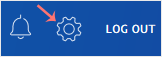
2. Click on the settings icon.
paypal-settings-icon.gif


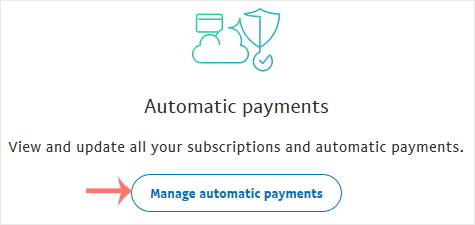
3. Go to the Payments menu and click on Manage automatic payments.
paypal-automatic-payments-button.gif


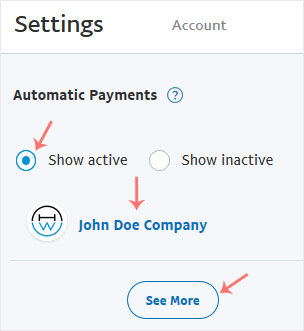
4. Tick-mark Show Active. If there is an active subscription, it will be displayed. In the case of many subscriptions, click on See More.

paypal-subscription-list.gif


Je li Vam ovaj odgovor pomogao?

Vezani članci

How to Cancel an Automatic PayPal Subscription   You can cancel pre-approved, automatic payments, or a subscription in your PayPal account.... How to Link a Debit or Credit Card to Your PayPal Account   Follow this tutorial to link your Debit or Credit Card to your PayPal Account.   1. Log in... How to Remove a Debit or Credit Card From PayPal   Follow this tutorial to remove your Debit or Credit Card from your PayPal account.   1. Log... How to Set a Preferred Payment Method in PayPal   With multiple Debit or Credit cards, you can set your proffered payment method in PayPal.... How to Subscribe to an Invoice via PayPal   You can subscribe to an invoice for recurring payments. The subscription option is only...
« Nazad

  Oblak oznaka

auto installer domain ICANN domain install applications install Joomla install Wordpress verify WordPress

  Podrška

Moji zahtjevi za podršku
Obavijesti
Baza znanja
Preuzimanja
Status mreže
Podnesi zahjtev
  • Kontaktirajte nas
  • Uvjeti korištenja

Autorsko pravo © 2025 R7 World. Sva prava pridržana.


Učitavanje...
Učitavanje...
Odaberite jezik
العربية
Azerbaijani
Català
中文
Hrvatski
Čeština
Dansk
Nederlands
English
Estonian
Persian
Français
Deutsch
עברית
Magyar
Italiano
Macedonian
Norwegian
Português
Português
Română
Русский
Español
Svenska
Türkçe
Українська

Odaberite valutu

₹ INR
$ USD

Generiraj lozinku

Molimo unesite broj između 8 i 64 za duljinu lozinke