R7 World
  • 0 Winkelwagen
  • Startpagina
  • Winkel
    • Blader door alles
    • Best Web Hosting
    • Premium Web Hosting
    • Cheapest Shared Hosting
    • Wordpress Hosting
    • Ecommerce Web Hosting
    • Developer Hosting
    • Reseller Web Hosting
    • Master Reseller
    • VPS
    • Domeinnaam registreren
    • Domeinnaam verhuizen
    • WP-toolkit
  • Nieuws & Aankondigingen
  • Kennisbank
  • Netwerk status
  • Filialen
  • Neem contact op met ons
  • Meer
  • Rekening
    • Aanmelden
    • Registreren
    • Wachtwoord vergeten?
  1. Klantensysteem Home
  2. Kennisbank
  3. CloudLinux (cPanel)
  4. How to Change the PHP Version via CloudLinux Selector in cPanel

  Categorieën

Backup/Restore
4
Category Name
1
Cloudflare (cPanel)
9
CloudLinux (cPanel)
10
Cpanel
1
cPanel - Control Panel
24
Databases
11
DirectAdmin
48
DNS - Nameservers
6
Domain Management
10
Email
17
FTP
9
Installing a Control Panel
6
Mail Filters & SPAM
8
Mobile
11
Others
3
PayPal
7
Plesk
47
Security
10
SiteWorx (Control Panel)
58
Softaculous
69
SolusVM
18
SSL
5
Virtualizor
19
WHM
18
WordPress
17

  Categorieën

  Tag-cloud

auto installer domain ICANN domain install applications install Joomla install Wordpress verify WordPress

  Ondersteuning

Mijn Support Tickets
Nieuws & Aankondigingen
Kennisbank
Downloads
Netwerk status
Maak een helpticket aan

How to Change the PHP Version via CloudLinux Selector in cPanel Afdrukken

  • 0


You can use CloudLinux's Select PHP Version to change your website's PHP Version. CloudLinux provides various PHP Versions to choose from.


1. Log in to your cPanel account.

2. In the Software section, click on Select PHP Version.

cP-CL-Select-PHP-Version-icon.gif


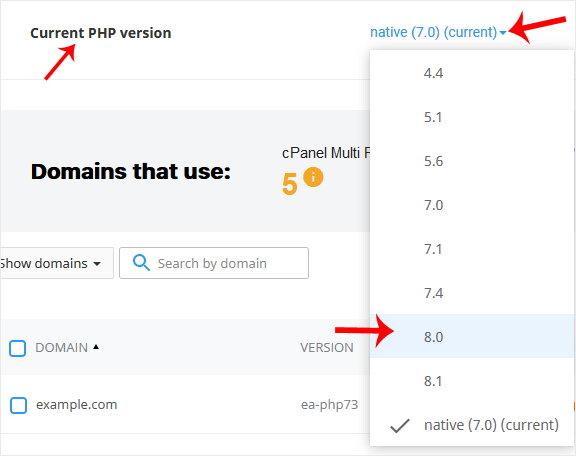
3. To the right side of the Current PHP version, click on the drop-down menu and choose the version you want to use.
cP-CL-current-PHP-version-option.gif


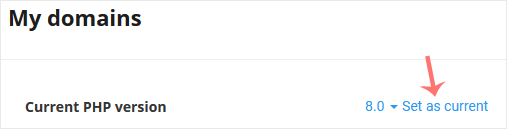
4. Click Set as current.

cl-set-as-PHP-version.gif


Was dit antwoord nuttig?

Gerelateerde artikelen

How to Increase PHP's upload_max_filesize Value Using CloudLinux Selector in cPanel   You can modify PHP's upload_max_filesize as per your needs using CloudLinux's PHP Selector in... How to Increase PHP's post_max_size Value Using CloudLinux's Selector in cPanel   You can modify PHP post_max_size as per your needs using CloudLinux PHP Selector in cPanel.... How to Enable or Disable PHP Extensions Using the CloudLinux Selector in cPanel   You can use CloudLinux Selector to enable or disable available PHP extensions in cPanel.... How to Enable or Disable PHP's allow_url_fopen Using CloudLinux Selector in cPanel   You can use CloudLinux Selector to enable or disable the allow_url_fopen directive in cPanel.... How to Enable or Disable PHP's display_errors via CloudLinux Selector in cPanel   Sometimes, we need to debug PHP. Hence, we need to enable display_errors or disable them for...
« Terug

  Tag-cloud

auto installer domain ICANN domain install applications install Joomla install Wordpress verify WordPress

  Ondersteuning

Mijn Support Tickets
Nieuws & Aankondigingen
Kennisbank
Downloads
Netwerk status
Maak een helpticket aan
  • Neem contact op met ons
  • Algemene voorwaarden

Copyright © 2025 R7 World. Alle rechten voorbehouden.


Laden...
Laden...
Kies taal
العربية
Azerbaijani
Català
中文
Hrvatski
Čeština
Dansk
Nederlands
English
Estonian
Persian
Français
Deutsch
עברית
Magyar
Italiano
Macedonian
Norwegian
Português
Português
Română
Русский
Español
Svenska
Türkçe
Українська

Kies valuta

₹ INR
$ USD

Genereer wachtwoord

Voer een wachtwoord in dat uit 8 tot maximaal 64 tekens bestaat.